A custom Mastodon reply button
One of the great things about Mastodon is its decentralized nature. However, this very decentralization can also lead to frustration; have you ever tried linking to a Mastodon post so someone can respond to it?
The person will most likely land on a different instance and then has to navigate back to their own instance to be able to respond to the post. Even a simple "Follow" button quickly becomes an obstacle.
Others have recognized this and are working on solutions, such as the "Universal Follow Button", which may one day be released. And while I'm almost finished writing this article, the new Share Button from Mastodon appears; more on that later.
Therefore, I've tried to simplify things on my site. Readers enter their Mastodon instance and are then taken directly to the relevant post.
There's a Mastodon post for (almost) every post on my site. Responses to these posts are synchronized and displayed below the post on my site; the [[/kirby/indieconnector|IndieConnector]] handles this.
I could automatically link to this post, but then I'd run into the problem described above. Users would be directed to my instance, not theirs, and wouldn't be able to respond directly – suboptimal.
Instead of linking directly to the post, my readers first have to enter their instance and can then choose whether to save that instance (in their browser):
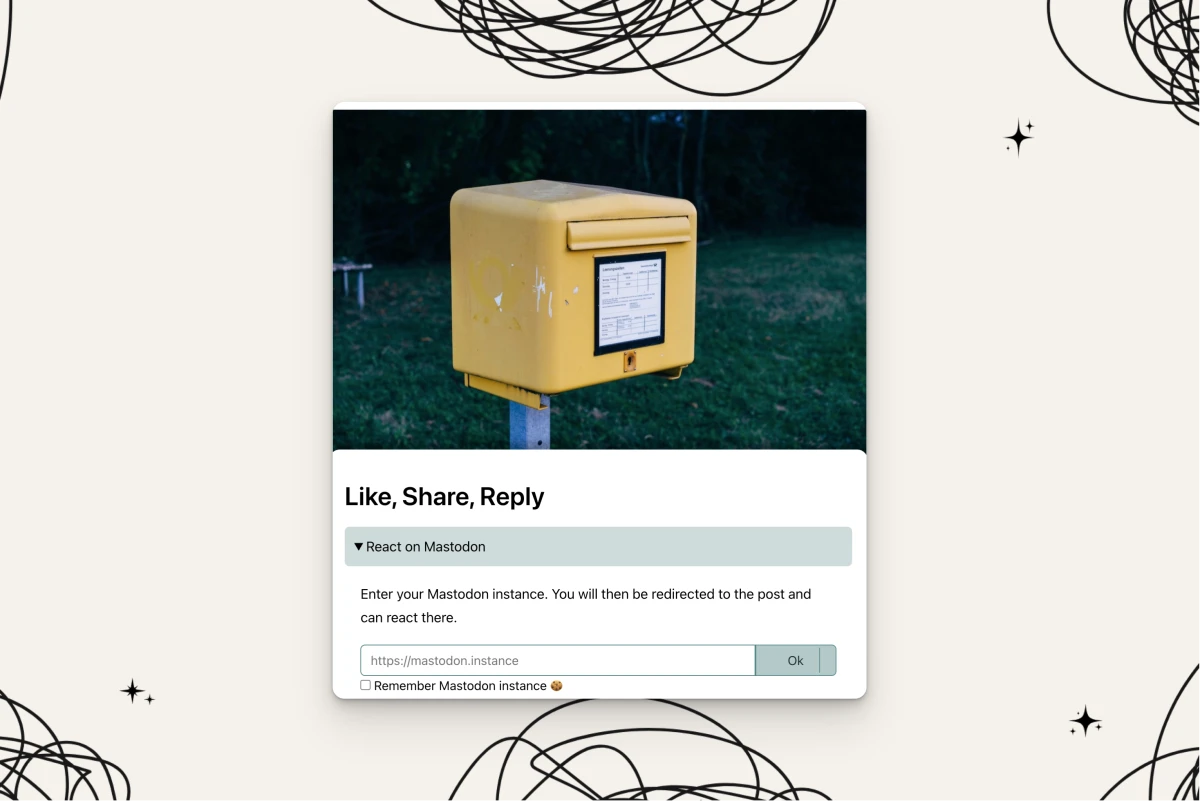
The form is a simple one:
<form action="/reply/mastodon" method="post">
    <input type="url" value="" name="instance" id="instance" placeholder="https://mastodon.instance" required>
    <input type="hidden" name="target" value="<?= $mastodonUrl ?>">
    <button type="submit" class="button-primary">Ok</button>

    <input type="checkbox" name="rememberInstance" id="rememberInstance" value="true">
    <label for="rememberInstance" class="remember">
        Remember
    </label>
</form>
Essentially, the form contains two pieces of data:
- The user's instance
- My current Mastodon post URL
Clicking the button then redirects to the instance and displays my post, which can then be directly interacted with.
I'm implementing this using a Kirby route, but it works just as well with a simple PHP file that can be accessed anywhere.
Here's what the route looks like:
[
    'pattern' => 'reply/mastodon',
    'method' => 'POST',
    'action' => function () {
        $request = kirby()->request();
        $data = $request->data();

        if (!isset($data) || empty($data)) {
            return new Response('No POST data found', 'text/plain', 400); // Not Acceptable
        }

        $instanceUrl = Url::stripPath($data['mastodonInstance']);
        $url = $instanceUrl . '/authorize_interaction?uri=' . $data['target'];

        if ($data['rememberInstance'] == true) {
            // set cookie
            Cookie::set('mastodon_instance', $instanceUrl, [
                'lifetime' => time() + 60 * 60 * 24 * 365,
                'path' => '/',
                'httpOnly' => false,
            ]);
        }

        header::redirect($url);
    },
],
The code would look similar without Kirby (abbreviated):
$data = $_POST;

$parsedUrl = parse_url($data['mastodonInstance']);
$instanceUrl = $parsedUrl['scheme'] . '://' . $parsedUrl['host'];

$url = $instanceUrl . '/authorize_interaction?uri=' . $data['target'];

if (!empty($data['rememberInstance'])) {
    setcookie(
        'mastodon_instance',
        $instanceUrl,
        [
            'expires'  => time() + 60 * 60 * 24 * 365,
            'path'     => '/',
            'httponly' => false,
        ]
    );
}

header('Location: ' . $url);
It's also a good idea to check if the data is empty and if it's a POST request. Since many readers will likely be using a CMS, I've decided to omit these details, as they'll probably be handled by the system anyway.
The real magic is hidden in a single line and is quite simple:
$url = $instanceUrl . '/authorize_interaction?uri=' . $data['target'];
We construct a new URL from the given information, starting with the entered instance (without any path appended), the path /authorize_interaction, and the uri parameter, which contains the full URL to our Mastodon post.
The endpoint /authorize_interaction does exactly what you'd expect: it allows interaction with, in this case, a post. As we follow the flow, we're already on our own instance and can then use this endpoint to react to the post, regardless of which instance it's on.
This also works with user profiles and is useful for a "follow button," like the one the service mentioned above intends to offer.
Ideally, our readers only need to enter their instance once and can then interact with our Mastodon content without any further hassle, as they always end up on their own instance and see the respective post or profile there. We've eliminated the cumbersome searching and copying/paste process for them.
Since March 2nd, Mastodon has an official share button that you can easily create yourself:
https://blog.joinmastodon.org/2026/03/a-new-share-button/
And although I like the idea, I have two problems with it:
- It creates a new post
- It eliminates decentralization
In my specific use case, the IndieConnector only retrieves reactions to posts that are registered in the plugin. There's a one-to-one relationship between the blog post and the Mastodon post. However, the share button always creates new posts. That's not what I want.
It's certainly suitable for anyone who wants readers to be able to quickly and easily share quotes or URLs as their own posts. But!
Everything runs through share.joinmastodon.org. Users have to enter their instance there and are then redirected to that instance to create a new post using the share endpoint.
We can guess what's happening behind the scenes: probably exactly what we're doing in the PHP code described above.
That's perfectly fine in itself, except for one thing: there's a central interface. Every share button or link now runs through share.joinmastodon.org. Call me picky, but that's precisely what we wanted to avoid with Mastodon.
Now, not everyone is a developer or wants to vibe code some mysterious PHP code, but for them, this is at least a good starting point. However, those who can should probably take the approach described above. This has the advantage that our own website is the "central" interface, and the reader is already on it anyway. Furthermore, the /authorize_interaction endpoint isn't purely a Mastodon endpoint, but part of ActivityPub and can therefore also be used outside of Mastodon.
I'm curious to see how the follow button will be implemented. In any case, you now have a few simple lines of PHP code and a helpful endpoint at your fingertips, which you can use to integrate all of this right now without external services. Have fun!